Lockdown 2 Logo 🔑
I’m currently having to self-isolate after receiving an alert from the NHS Track & Trace app that I’ve been in contact with someone who has Coronavirus. I’m fine, and no symptoms, but I’ve been housebound for only 2 out of the 10 days and I’m already going crazy.
I’m currently having to self-isolate after receiving an alert from the NHS Track & Trace app that I’ve been in contact with someone who has Coronavirus. I’m fine, and no symptoms, but I’ve been housebound for only 2 out of the 10 days and I’m already going crazy.
With the UK about to go into a second national lockdown, I thought I’d work up a concept idea as a process showcase. Here’s a potential ‘Lockdown 2’ logo…
I posted this to the r/LogoDesign channel on Reddit (a little nervously after last time). Thankfully, everyone seemed to like it, and I even had some suggestions for a potential version2. Which do you prefer?


How do you rebrand a logo designer?
As I transition slowly into specialising in logo design, it’s time to redo my 5 year old logo.


The very first Barnard.co logo
When I first went freelance in 2015, I often worked alongside Wordpress developer Andy White. He would hire me to design websites, which he would then build for his clients. When I sent him over my first invoice… he burst out laughing.
“What the f*** is that?!”, he said.
At first I thought he was referring to my ludicrously low day rate. “Sweet Jesus, that is awful!”, he went on. And it hit me, he was pointing at my logo.
Admittedly, I had knocked it up pretty quickly as a sort of placeholder, until I could devote some real time to it. But yes, it was terrible.
A new dawn
While I was out at lunch, another designer sitting next to us, longtime friend and dev/designer unicorn Andy Styles played around with some logo ideas for me. When I got back, he presented me with what would become my company logo for the next five years.

I loved it! It was simple, it featured the domain name, it used a strong typeface and the square format lent itself perfectly to the space on my portfolio website. It also looked brilliant on a business card.
It hadn’t taken Andy more than half an hour to make, but I went about adding it to every piece of real estate I used under my company name, and there it stayed.
It wasn’t until I updated my portfolio website last month that I noticed a small issue with it. I went to add it as a favicon (the little icon next to the tab at the top of your browser), and the small scale made it completely illegible.
As a fix, I made a sort of iconised version of it that replaced the characters for squares and threw it up on the site.

You specialise in logos, right?
This favicon problem got me thinking. What better time to revamp my logo? I recently made the switch to working only as a logo designer, and as much as I love Andy’s original design, what does it say about me if I can’t claim to have designed my own business logo?
Funnily enough, simplifying Andy’s logo into a 3x3 set of squares might just make a nice looking logo. It’s a simple, bold design. I’d already proven that it scales well and it has meaning to me as it plays homage to the old layout.
So I went about perfecting it.
The Golden Ratio

The Golden Spiral
I recently read an article about how to craft designs that use the Golden Ratio. I’ve known about the Golden Ratio and its use in design layout for some time, but I’ve been seeing more and more logo designs that base their entire structure around its proportions.
For the uninitiated, this ratio (1.61803398874989…), the ‘Divine Proportion’ is found all around us. It’s in nature, in ancient architecture and mathematics (the Fibonacci scale uses it). When applied to design, it is supposed to create balanced layouts that are more pleasing to the eye. You’ll probably have seen the Golden Spiral before.
I started out by redrawing the proportions in Adobe Illustrator. You draw a square, duplicate it and lay it underneath the first. Then draw another square the height of the first two along side. Rotate all three together by 90 degrees and then repeat another square at the height of the group. Then keep going until you have as many proportions as you need. When I had finished, I ended up with this grid to use as a starting point.

All the squares grouped together and centralised.
I went about using the grid squares to reform the 3x3 favicon idea. All the while, taking care not to resize any of the proportions.

And here is the new logomark (right) compared with the old favicon version.

There’s no denying that new option breathes better. It’s hard to pinpoint why it’s more visually pleasing. Perhaps the clear space around the 3x3 squares frames the icon more neatly, or the added stroke weight to the outer border makes it bolder and more of a statement. But that’s the magic of the Golden Ratio.
I then just rounded off the corners ever so slightly to soften the whole thing a little.

The logo is so simple, surely someone has done it before?
You’d think so wouldn’t you?
I mean, it’s a 3x3 square pattern. Someone must have used this for a logo design already. But after an extensive search and Google Reverse Image lookup of my design, the closest in similarity I could find in logo format was for an app called 9square. And even then it’s only used as an app icon, which I think is broad enough of an icon design to not infringe on any copyright.
Even better, this design has so much meaning to me.
Firstly, it pays homage to my old logo, a sign that my company is evolving and improving. It’s a nice representation of a grid, something constantly used in design. It also resembles the format for the portfolio items on the home page of my website. Finally, and this bit is nerdy, it reminds me of the Rubik’s cube that forever sits on my desk. Something that I toy with when I’m conceptualising ideas for clients and to relieve a little stress.
It’s perfect for my business.
I then added the company name under the logo (appropriately spaced of course) in my favourite font Futura, which is currently used across my website. I kerned the letters a little and replaced the round full-stop with a square one to match the logomark.

Love it or hate it? Want something similar?
Did that get your creative juices flowing? If you’d like to know more about my process, or you need details of my pricing structure for your own company logo, then visit my logos pages, or just drop me an email at james@barnard.co and we’ll get started!
Edit: After I posted this animation to Reddit, I was torn apart for this logo. Read the comments, and my response here. Plus here’s a bonus Instagram post about dealing with negative criticism.


Logo Showreel: My 10 year anniversary
This year marks my 10th year as a full-time designer. I’ve come a long way since my first graphic design job at Runner’s World magazine.
This year marks my 10th year as a full-time designer. I’ve come a long way since my first graphic design job at Runner’s World magazine. I started a little late into my life, side-stepping from a career in project management at the age of 25, before eventually working my way up through the publishing industry to a brilliant role at the Daily Telegraph.
But since I went freelance in 2015 I’ve never looked back. The freedom to work with the clients I choose, along with a lifestyle that allows me to spend more time with my wife and daughter, means the absolute world to me.
However, as my freelance career has burgeoned, I’ve always felt like a bit of a mercenary. A gun for hire. I’ve worked hard at advancing my skills in all sorts of design areas, and that has meant that as a ‘pay-by-the-hour’ freelancer I’m incredibly hireable, as I can work across projects that require photoshop work, print design, branding, website building and even video production and animation.
But since I haven’t focussed my expertise in any one area, my ‘business of design’ has plateaued.

10 years of logos
Time to specialise
Recently, I made a business decision to start transitioning to working only as a logo designer.
That’s right, just branding jobs for me from here on. It’s the part of my job that I enjoy the most. It’s pure creation, and most importantly I’m good at it. So over the next year, I will be taking on as many logo design jobs as I can get my hands on, and gradually moving on from working as an ambiguous, Jack-of-all-trades graphic designer.
James Barnard - Logo Designer
With my laser-focussed business model now decided upon I set up a landing page, and recently completed the showreel above to market my talents. I’ve also worked hard on a new pricing structure, moving away from hourly billing and building in three tiers of packages called ‘Starter’, ‘Professional’ and ‘Deluxe’. If you’d like to know more about these design packages, then please get in touch.
Why I’m ditching Wordpress for Squarespace
This month I followed the advice I’ve been giving to my clients for the past year and moved my portfolio (this website) onto Squarespace.

It’s 4am. My phone buzzes as an email arrives from WebGazer Alerts with the subject, “Heads up: Barnard.co is down”.
I visit wp-admin, the Wordpress backend, and the favicon in my browser tab just spins. I’ve got no way into my own site. I drop a message to a friend of mine, a back-end developer and ask for help. When he wakes up, he tells me, “Hmm, I’m struggling to connect to your box via SSH”.
U wot m8?
This happens ALL. THE. TIME.
Someone has hacked into my site either via an outdated Wordpress plugin, or is trying to brute force my Wordpress password and has subsequently crashed my site by overloading it with traffic.
I once logged onto the homepages of all of my client’s websites to receive the creative ditty in the top left-hand corner, “Site hacked by hacker”.
I don’t have a clue how to fix issues like this. So, flustered (usually with clients screaming at me) I go pleading to my back-end mate to help me fix it. It is a nightmare.

The other day, I logged into the backend of my portfolio website to receive the message that multiple pages on my site had experienced page errors. As usual, I hadn’t touched a single thing on the site in months, so an automatic update to either the theme, Wordpress or a plugin has caused a bug that has destroyed half of my website.
And without extensive knowledge of PHP, I won’t be able to fix it.
NO MORE!
This month I followed the advice I’ve been giving to my clients for the past year, and moved my portfolio onto Squarespace. I completed the site migration in about two days, and needed zero help from any developer. The site is cleaner, easier to navigate and I even managed to set up 301 redirects so that my old content links after a few url changes.
There’s even an import tool to migrate all my old Wordpress posts into Squarespace, so the bulk of the work was resizing images into a new, larger format.
Let’s be clear
I am not a developer. I’m a freelance graphic designer that knows enough CSS to be able to hack a Wordpress theme into doing largely what I need it to do. I’ve only ever built simple poster websites on my own. The largest Wordpress project I have tackled is a wine shop with e-commerce functionality.
Sure, I have designed some complex systems in my time, for some massive companies. But I have always worked as part of a larger team, usually with front and back end developers to build my designs for me. And most of my personal clients these days are smaller businesses, that don’t require masses of bespoke functionality. They just need a website that they can be proud of, that looks nice and tells their story. I can help with that.
When I first discovered Wordpress (around 12 years ago) I was astounded by it. It meant that I could design a website for a client with a CMS system built in. And it was free! So with a carefully selected theme, and a little CSS jiggery-pokery I could give a website to a client that they could make changes to themselves (and I could charge slightly more for the privilege).
But somewhere along the way drag-and-drop website editors actually became useable. And Squarespace allows you to get surprisingly granular with the styling. So lowly designers like me now have a chance at building something beautiful.

“If Squarespace is so easy to use, then why do I need a designer?”
A fair point, and a question I get asked a lot in briefing sessions. After all, the Squarespace model is software as a service. You have to pay a subscription fee to use it, so why not save some costs and build it yourself using the amazing editing tools?
Because, good-looking websites still need that special something to stand out (aesthetically) from the crowd. Visual assets.
That, and a watchful eye for layout. Start adding your website content to the templates in Squarespace, and you’ll quickly find that the design gets away from you. Plus, without good iconography and decent image edits, your site is going to look the same as everyone else’s. The templates in Squarespace are a brilliant starting point, but after a few hours of tinkering, inconsistencies in spacing, text hierarchy and colour schemes will soon become apparent. And that polished theme you started with starts to become Frankenstein’s monster.

A map asset I made for the National Forest Trek website
There are other advantages. A designer will protect your brand, especially if they’ve worked with you to create it in the first place (a common situation for a logo designer like myself). Customising fonts and colour styles can be a little laborious, no matter how you cut it. So having a professional work through your site to optimise the styling for different screen sizes can be a real bonus.
On top of this, there are more cost savings to my clients. I mostly charge based on my time, and if a project takes longer it costs the client more. Setting up a Wordpress install and tinkering it until it looks and does what I want it to takes ages. The yearly fee for Squarespace is £180 (for a business plan), but the money saved on design costs pays for that ten times over. Because the simple fact is that I can knock up a Squarespace website three or four times faster than I can a Wordpress site.
But wait, there’s more
Yes, you can obviously make changes to your site yourself. And it’s a damn site easier than using Wordpress. But more importantly, if your website goes down in the middle of the night, and I’m in bed asleep (or more likely tending to a teething one-year-old), you won’t have to wait for me to wake up to fix it. Squarespace’s 24/7 support will handle that, which also benefits me massively as I can hand off the site completely at the end of a design project.

NXGN: I site I made for a sports mentorship project
Also the Squarespace subscription is basically what you would pay in hosting costs for a website with semi-decent traffic. And you can migrate your old website over incredibly easily (see above).
And, for me, this is the real clincher.
It allows me to offer payment options for non-profits or startup businesses that just don’t have the funds to invest in an all-singing, all dancing website. I can design a basic page template, set up their logo implementation, pick the right colours and fonts and just let the client run with this.
The editing tools are designed specifically for anyone to be able to do it, so clients can go ahead and do the grunt work of populating a basic template without me. Sure, the end product might not have the same polish that it would if I could complete the entire project, but it allows for professional grade design to become accessible. And I have already worked with a number of one-man-bands and charities to help them get their businesses off the ground. Building Wordpress sites for clients like these would result in me having to turn the job down due to lack of funds.
I still love you Wordpress
I’ll always hold a soft spot for Wordpress, and there’s a reason why a quarter of the world’s websites run on it. It’s a powerful product, and I’ll be forever indebted to the founder Matt Mullenweg for giving it away in an open source format.
I based my career off of building CMS websites for clients, and having knowledge in how to use it has opened up so many opportunities for me. I started as a ‘web designer’ and that job title has morphed and eventually been cast aside as I’ve delved more and more into graphics and less and less into development. To the point where the basic coding I learned at university (building table-based websites) is now utterly useless, and instead of investing the time to stay up to date with HTML/CSS and what ever the f*ck coding languages there are now, I’ve invested my time in learning video editing, animation and picking up new skills in design software.
So when a product came along that allows me to really design a website and see it live, quickly, with no knowledge of coding needed, I just had to make the switch. That and I’ll never get chills again from receiving an email with the subject “Your site has updated to Wordpress version 4.9.11”.
EXAMPLES
Here are some gifs of sites I’ve made with Squarespace. Note the video backgrounds, parallax content blocks and some subtle animations. They are a mixture of the powerful editing tools of Squarespace, combined with video edits/animations and luscious graphics that I have created for the clients.
If you’d like my help creating something like this, then by all means get in touch.
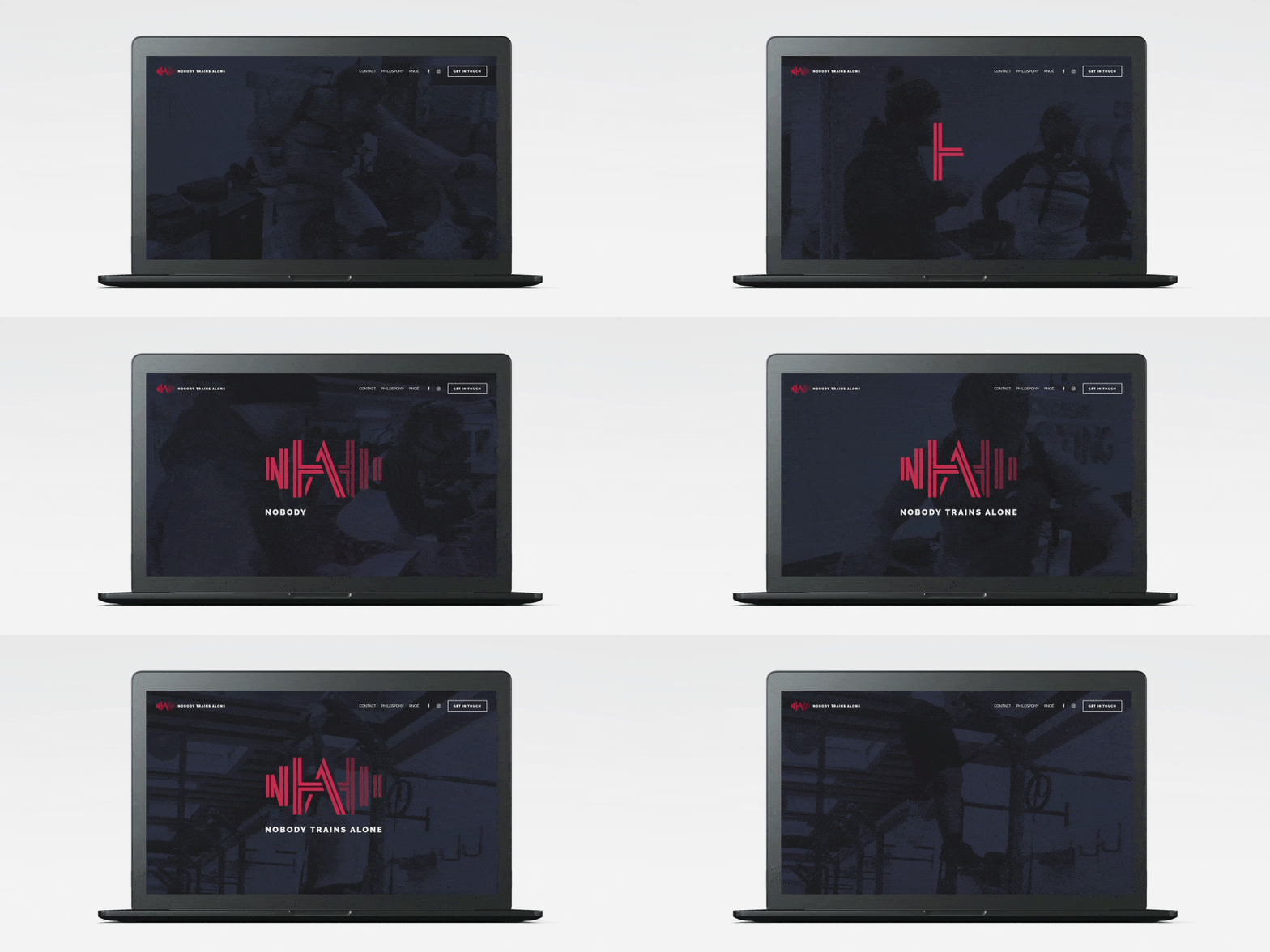
Nobody Trains Alone

David Edgar Football Coaching

National Forest Trek (sorry for the jittery scrolling)
Join The Resistance: Keep Your Distance
With the coronavirus spreading to all corners of the world, the United Nations and Talenthouse enlisted the help of creatives around the world.

With the coronavirus spreading to all corners of the world, the United Nations and Talenthouse enlisted the help of creatives around the world.
Thousands of creators generously submitted their work to help communicate important messages that can combat the spread of COVID-19. The creative work was free to share and available in multiple creative formats and languages, and of course, I submitted a piece!
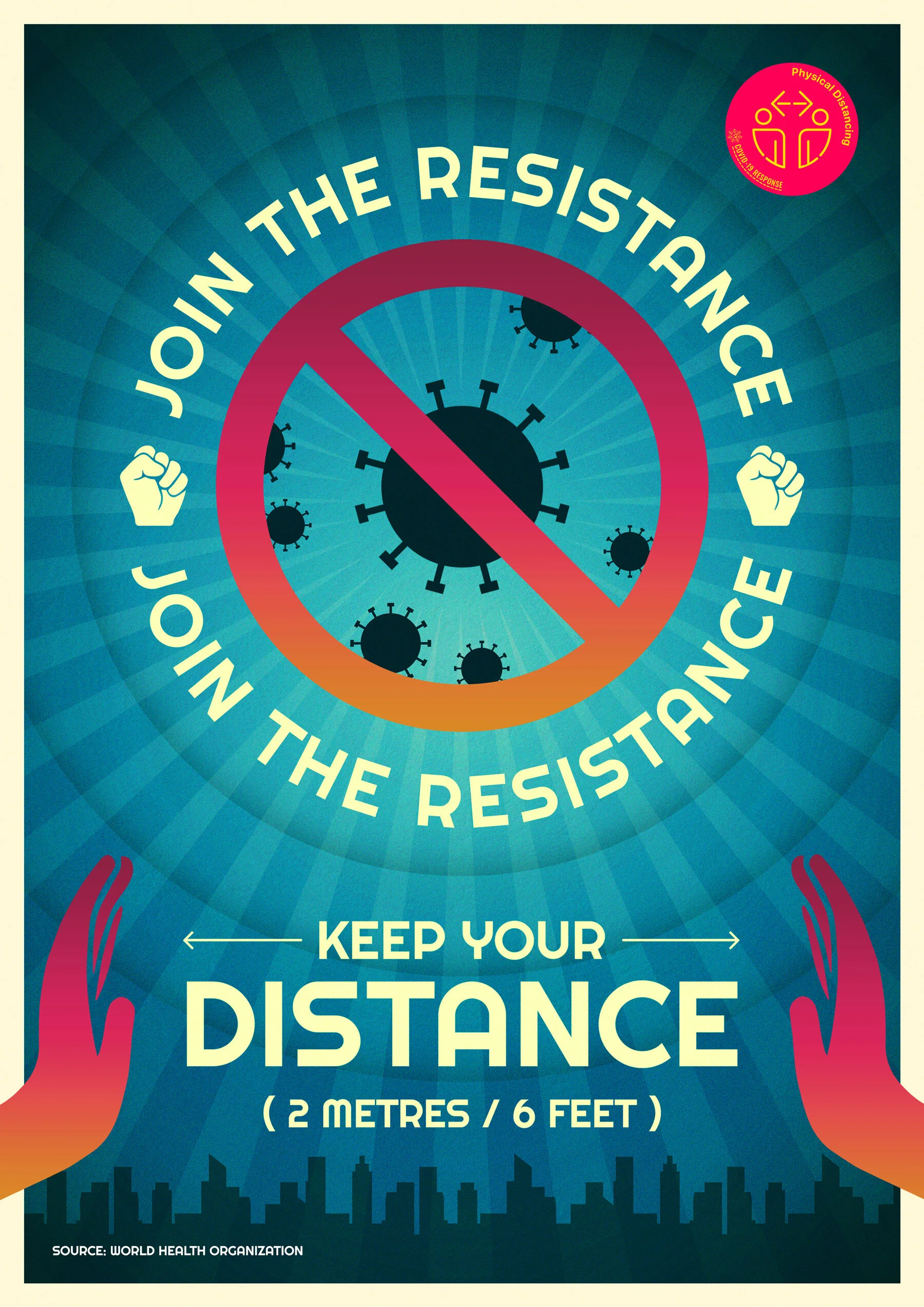
I tried to theme the design as an old propaganda style poster, with a punchy slogan, chunky lettering and some weathered colours (apart from the pink/orange gradient, which is trying to stay in keeping with the UN badge).
My submission was eventually shortlisted, and added to the pool of content housed on the campaign’s website. This meant that anyone around the world was free to use the work in any format, so long as I was credited.
You can find the poster here.
Engraving the Barnard Crest
Two years ago, I digitised our family crest as part of a Christmas present project for my Dad. My dad is massively into genealogy, so I made him an A2 family tree, using his extensive research of our family lineage.

Two years ago, I digitised our family crest as part of a Christmas present project for my Dad. My dad is massively into genealogy, so I made him an A2 family tree, using his extensive research of our family lineage. But since we could only find a low resolution version of our family crest, I decided to turn to Adobe Illustrator to make a vector version.
Adobe Illustrator
It's my dad's 65th birthday this year, and as a gift my brother Edward and I decided to get the Barnard crest engraved on a silver coin for him. It's a present that combines his two favourite hobbies; numismatics (otherwise known as coin collecting) and genealogy.
My brother had tried to get this done before, but he was initially quoted something alone the lines of £1000! I believe that this was because they would be using a pressing machine to stamp it to a coin, and creating a 3D press would have been hugely expensive.
Instead, I looked into laser engraving. This is a much cheaper solution, but I would need to create a single colour version of the crest. So I dove back into Illustrator to make a vector version in black.

I moved the diamond away from the bear, outlined some of the detail and cut the white away from the black, so the final file was a single colour shape.
The next step was to create a coin design.

I made an inverse version to sit inside a black circle, and then added some detail around the edge to mimic a coin style. This was then sent off to the engraver as an EPS, to be added to a one-inch disk of sterling silver.

A chap called Lester at Laser Engraving Services, used a fibre laser to score the design, and then coloured it with platinum for a dark finish. And on top of this, they turned it round in a day. I sent the design files on a Wednesday, and had the coin in my hand on Thursday!
The result was amazing. I was so pleased with how this turned out, as was my dad.